
Free Online Image Compressor
Compress JPG, PNG and WebP images, reduce a photo to a target size such as 20KB, 100KB or 1MB, or convert to JPG or WebP. Compare the result with your original and download it.
English
Language
Drop your image here
or
Supported: JPG, JPEG, PNG, WebP
Maximum file size: 20 MB
You can also paste an image from your clipboard.
- File name
- Dimensions
- File size
- Format
Before and after
Drag the slider, or use the arrow keys, to compare. Zoom in on your device to check fine detail.
Original
- Size
- Dimensions
- Format
Compressed
- Size
- Dimensions
- Format
Your image is processed for compression and is not permanently stored. In modern browsers, compression runs on your device, so the image is not uploaded. Older browsers that cannot encode WebP or PNG fall back to our server, where the image is processed in memory and discarded as soon as the result is returned. Privacy policy
Simple, free and private
-
Free to use
Compress and convert as many images as you like, with no fees or watermarks.
-
No registration
No account or email needed. Open the page and start right away.
-
JPG, PNG and WebP
Works with the most common image formats and converts between them.
-
Up to 20 MB
Upload large photos straight from your phone or camera.
Which setting should I use?
Match what you are trying to do with the right mode or converter.
| If you want to… | Use | Why |
|---|---|---|
| Upload a photo to a form with a size limit | Target size | Choose 100 KB (or any size from 20KB to 2MB) and JPG output. |
| Upload a signature image | Target size | A custom 20 KB target suits dark ink on plain white paper. |
| Shrink a screenshot or logo but keep transparency | PNG compression | Palette reduction keeps sharp edges and transparent areas. |
| Speed up images on a website | JPG to WebP | WebP is often smaller than JPG at a similar visual quality. |
| Open or upload a WebP where only JPG works | WebP to JPG | JPG is the most widely accepted photo format. |
How to compress an image
Three steps, no account and nothing to install.
-
Upload your image
Drag and drop a JPG, PNG or WebP file, choose it from your device, or paste it from your clipboard.
-
Choose your settings
Set the quality, optionally pick a target size such as 100 KB, and keep the original format or convert to JPG or WebP.
-
Compare and download
Check the before-and-after comparison and the size saved, then download the compressed image.
One compressor, every mode
Image compression removes data that contributes little to how an image looks. A photo straight from a phone camera is often several megabytes, and much of that detail is never visible on a screen. This compressor handles every common job from one page, with three controls:
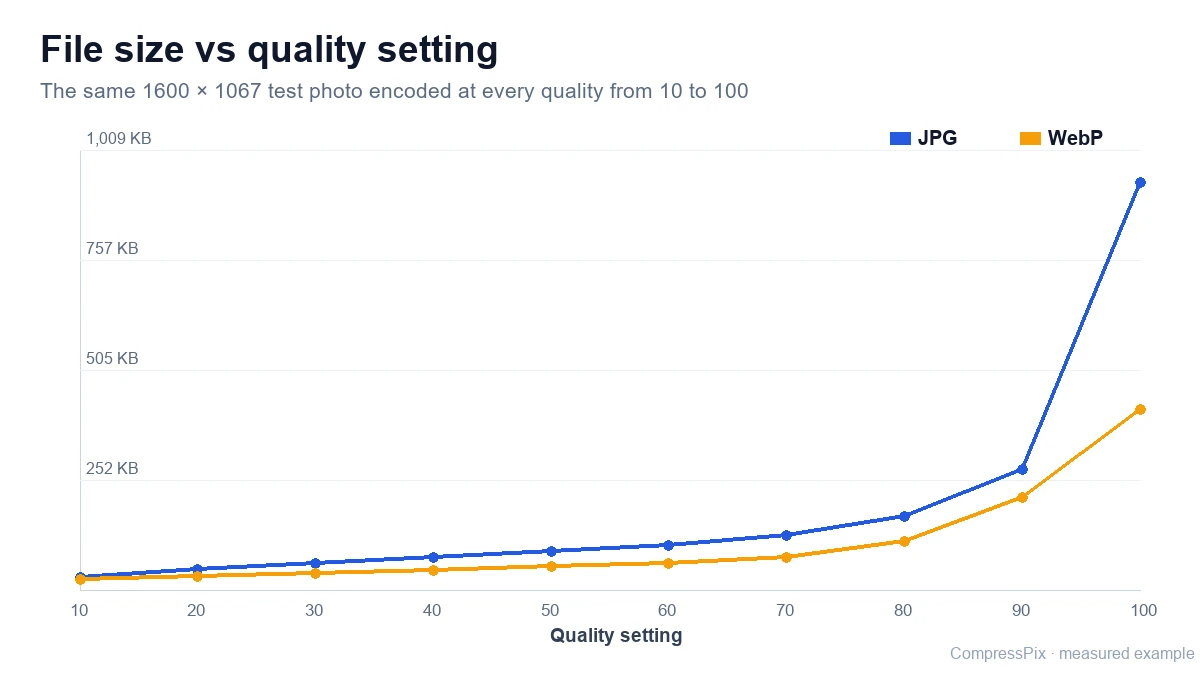
- Quality (10–100%) — lower values give smaller files with more visible compression. For JPG and WebP photos, 70–85% is a good range.
- Target size — choose 50 KB, 100 KB, 200 KB, 500 KB or 1 MB, or enter any custom size from 5 KB to 20 MB. The tool finds the highest quality that fits and reduces dimensions only if that is not enough.
- Output format — keep the original format, or convert to JPG or WebP, which are usually smaller for photographs.
Every result shows the real original size, compressed size, dimensions and percentage saved. Re-encoding also removes embedded metadata such as camera EXIF data and GPS location.
Compress JPG and JPEG images
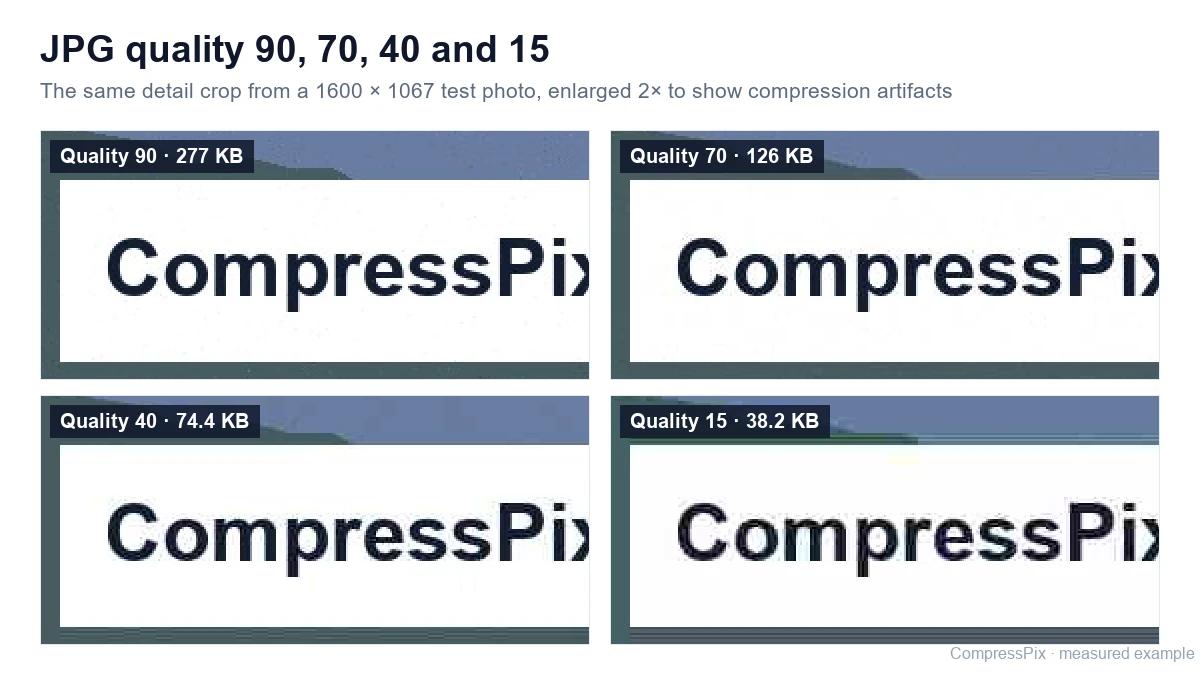
JPG (also written JPEG) is the standard format for photos. It uses lossy compression: the quality setting controls how much fine detail is rounded away. Photos from phones and cameras are saved at high quality, so there is usually a lot of room to shrink them. Upload a JPG and keep Same (JPEG) as the output.
- 75–85% suits websites, sharing and most everyday use.
- 55–70% suits thumbnails and strict size limits.
- Always compress from the original. Each lossy re-save compounds earlier losses.
- JPG has no transparency. Converting a transparent image to JPG fills transparent areas with white.
JPG output is always encoded by your browser, so the photo is not uploaded.
Compress PNG images and keep transparency
PNG is lossless, which makes it ideal for screenshots, logos, diagrams and anything with transparency, but large for photos. Upload a PNG and keep Same (PNG) as the output:
- Below 100% quality, the image is reduced to a palette of up to 256 colours. Lower quality means fewer colours: about 256 at 90% and above, down to 16 at 10%. Full and partial transparency are kept.
- At 100%, the PNG is re-saved losslessly with maximum compression.
- Photos saved as PNG are usually far smaller as JPG, or as WebP if they need transparency. Use the PNG to JPG or PNG to WebP converter.
Palette reduction runs in your browser. Older browsers without the required features fall back to our server, which keeps transparent PNGs lossless.
Compress WebP images
WebP covers what used to need two formats: lossy compression for photos and lossless compression with transparency for graphics. All current major browsers display it, and a lossy WebP is often smaller than a JPG at similar visual quality. Upload a WebP to shrink it further, or choose WebP as the output to convert a JPG or PNG.
- Start around 75–80% for photos. WebP and JPG quality numbers are not directly comparable, so judge the result, not the number.
- Transparency is kept. Animated WebP files keep only their first frame.
- Some older software, upload forms and print services do not accept WebP. Use the WebP to JPG converter for those.
WebP is encoded in your browser where supported (current Chrome, Edge and Firefox); otherwise our server compresses it in memory without storing it.
Compress an image to a specific size (20KB to 2MB)
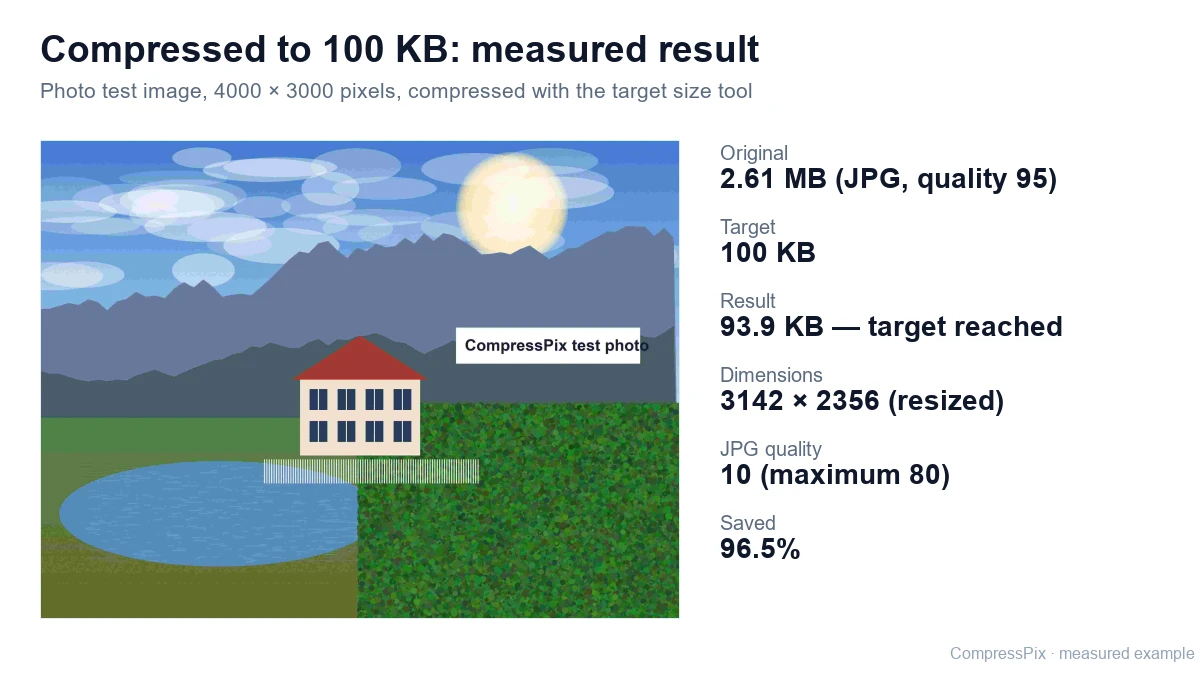
Application forms, portals, marketplaces and email often cap file sizes. Choose a preset under Target size, or select Custom size and enter any value in KB. The tool tries your chosen quality first, then the highest quality that fits, and reduces the width and height only if even the lowest quality is too large. The result screen says whether the target was reached.
| Target | Typical use | Tip |
|---|---|---|
| 20 KB (custom) | Signature uploads, tiny ID images | Dark ink on plain white paper, cropped tightly, fits easily. |
| 50 KB | Small form photos, avatars, thumbnails | Crop to the face and use a plain background. |
| 100 KB | Application forms, ID and profile photos | Use JPG output; portraits around 600 × 800 pixels often fit. |
| 200 KB | Document uploads, listings, web images | Resize to the size the image is displayed at first. |
| 500 KB | Portfolios, large website photos | Raise the quality slider to 85–90% to keep detail. |
| 1 MB | Email attachments, high-resolution photos | Many phone photos fit near full resolution as JPG or WebP. |
| 2 MB (custom) | Near-full-resolution photos for listings | Convert large PNG screenshots to JPG or WebP first. |
Leave a small margin
This tool counts 1 KB as 1,024 bytes and 1 MB as 1,024 KB. Some websites count 1 KB as 1,000 bytes, so if a file very close to the limit is rejected, enter a slightly lower custom target, such as 95 KB for a 100 KB limit. Results are usually a little under the target, because encoders cannot produce an exact byte count.
Photos, signatures and scans
For small targets, cropping away empty space helps more than lowering quality. Scanned documents stay readable only at reasonable dimensions, so check text at 100% zoom.
Supported formats and limits
What you can upload, what you can download, and where each image is processed.
| Format | Upload | Download as | Where it is compressed |
|---|---|---|---|
| JPG / JPEG | Yes, up to 20 MB | JPG or WebP | JPG output: always in your browser |
| PNG | Yes, up to 20 MB | PNG, JPG or WebP | PNG output: in your browser, or our server in older browsers |
| WebP | Yes, up to 20 MB | WebP or JPG | WebP output: in your browser where supported, otherwise our server (in memory, not stored) |
Images can be up to 50 megapixels when processed in your browser, or 25 megapixels when the server fallback is used. One image is compressed at a time; select Compress Another Image to start the next.
Need a different format? The PNG to JPG, JPG to WebP, PNG to WebP and WebP to JPG converters have the output already selected.
Frequently asked questions
How do I reduce the size of an image?
Upload the image, choose a quality level (80% is a sensible starting point) or pick a target size, then select Compress Image. When the result appears, compare it with the original and select Download Compressed Image.
How do I compress an image to 100KB, 50KB or 20KB?
Under Target size, choose a preset such as 50 KB or 100 KB, or select Custom size and enter a value such as 20. Choose JPG output for forms. The tool finds the highest quality that fits and reduces the dimensions only if needed. The result is approximate and usually slightly under the target.
Is 100KB here the same as 100KB on an upload form?
This tool counts 1 KB as 1,024 bytes. Some websites count 1,000 bytes, so if a file very close to the limit is rejected, set a custom target a little lower, such as 95 KB.
Will compressing my image reduce its quality?
JPG, WebP and palette-based PNG compression are lossy, so some detail is discarded. At moderate settings the difference is usually hard to see at normal viewing size. Use the before-and-after comparison to check, and raise the quality if you notice artifacts.
Is JPG the same as JPEG?
Yes. JPG and JPEG are two file extensions for the same format, and the compressor accepts both.
Does PNG compression keep transparency?
Yes. When the output stays PNG or is converted to WebP, transparency is kept. Converting to JPG fills transparent areas with white, because JPG does not support transparency.
Is my image uploaded to a server?
In modern browsers, no. JPG, WebP and PNG compression runs in your browser. Only if your browser cannot encode WebP or PNG does the tool fall back to our server, where the image is processed in memory and not stored.
What is the maximum file size?
You can compress images up to 20 MB in JPG, JPEG, PNG or WebP format, one image at a time.
Why is my compressed image larger than the original?
This can happen when the original is already heavily compressed, or when you convert to a format that suits the image less well. Try a lower quality, a different output format, or keep your original. The tool always shows the real sizes so you can decide.
Does the image compressor work on my phone?
Yes. It works in current mobile browsers on Android and iOS, with photos from your gallery or camera roll. Very large images may be limited by the memory available on your device.
More answers in our image compression FAQ.