
Convert PNG to JPG Online
Turn large PNG photos and screenshots into widely accepted JPG files. Conversion runs in your browser, so your image is not uploaded.
Drop your image here
or
Supported: PNG
Maximum file size: 20 MB
You can also paste an image from your clipboard.
- File name
- Dimensions
- File size
- Format
Before and after
Drag the slider, or use the arrow keys, to compare. Zoom in on your device to check fine detail.
Original
- Size
- Dimensions
- Format
Compressed
- Size
- Dimensions
- Format
Your image is processed for compression and is not permanently stored. In modern browsers, compression runs on your device, so the image is not uploaded. Older browsers that cannot encode WebP or PNG fall back to our server, where the image is processed in memory and discarded as soon as the result is returned. Privacy policy
Simple, free and private
-
Free to use
Compress and convert as many images as you like, with no fees or watermarks.
-
No registration
No account or email needed. Open the page and start right away.
-
JPG, PNG and WebP
Works with the most common image formats and converts between them.
-
Up to 20 MB
Upload large photos straight from your phone or camera.
Why convert PNG to JPG?
PNG stores every pixel exactly. That is ideal for logos and interface graphics, but it makes photographs and busy screenshots very large. A phone photo or a full-screen capture saved as PNG can easily be several megabytes, which is slow to email, awkward to attach and often too big for upload limits.
JPG is a lossy format built for photographs. It discards detail that is hard to see, so the same photo is usually much smaller as JPG. It is also the most widely accepted photo format: many application forms, marketplaces, print services and older programs accept JPG even when they reject PNG.
This page is set up to output JPG. Upload a PNG, choose a quality or a target size, and download a .jpg file. If you would rather keep PNG and just make it smaller, try the PNG compressor.
How to convert PNG to JPG
-
Add your PNG
Drag and drop, choose a file or paste an image. JPG output is already selected.
-
Set quality or a target size
Use a higher quality for screenshots with text, or a target size such as 200 KB for an upload form.
-
Check and download
Compare edges and backgrounds with the slider, then download your .jpg file.
Transparency, quality and when to keep PNG
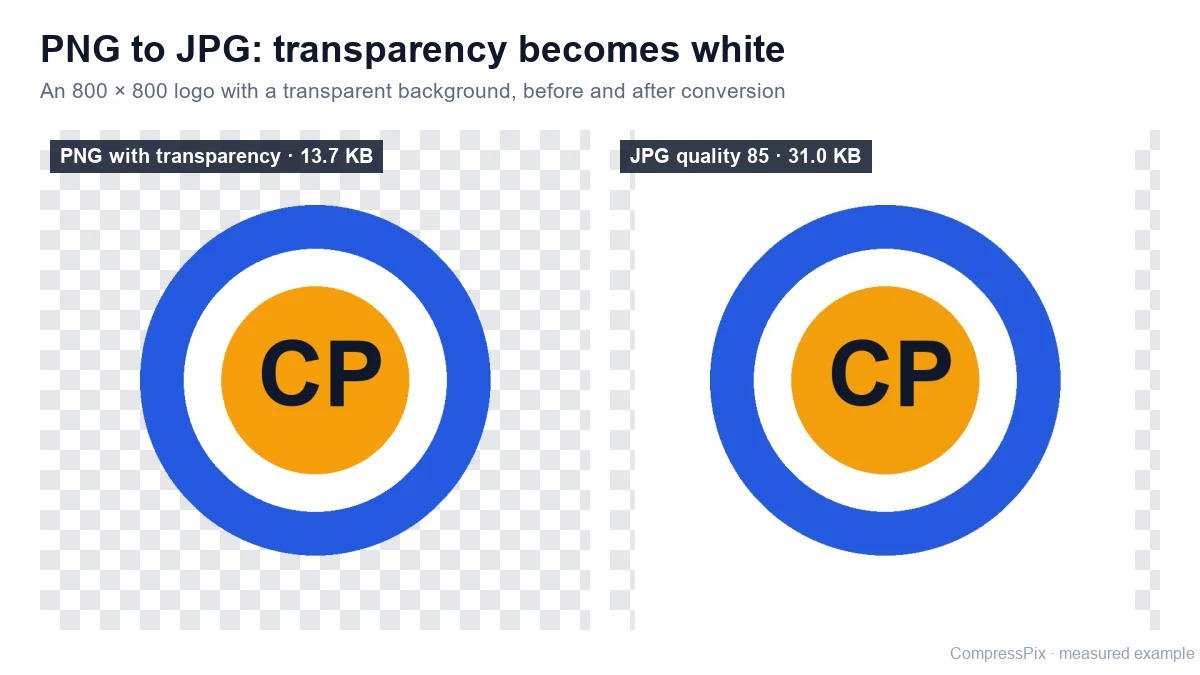
Transparent backgrounds become white
JPG has no alpha channel, so it cannot store transparency. When you convert, fully transparent pixels are filled with white, and partially transparent edges such as soft shadows or smoothed outlines are blended onto white. A logo that looked fine on a dark page will now sit in a white rectangle.
To check whether your PNG has transparency, open it in an image viewer or editor. Transparent areas are usually shown as a grey and white checkerboard. If you need to keep them, convert with the PNG to WebP converter instead, which keeps transparency.
Choosing quality for photos and screenshots
Photos hide compression well, so a quality around 80–85% is a sensible starting point. Screenshots with small text, sharp lines and flat colours show JPG artefacts more easily, as faint smudges around letters. For those, start around 90% and zoom in on text before downloading.
If a form sets a maximum file size, use a target size instead. The tool lowers quality first and only reduces the image dimensions if the target cannot be reached otherwise. Results are approximate, so check the final size shown before you upload.
When not to convert
- Logos and icons with transparent backgrounds or a few flat colours. They often stay sharper and can be small as a palette PNG.
- Text-heavy screenshots and diagrams where crisp edges matter more than file size.
- Images you will edit again. Each JPG save discards more detail, so edit the PNG and convert once at the end.
Whatever you choose, keep your original PNG. The converted JPG cannot give back the detail or transparency it removed.
Privacy and file details
JPG output is always encoded in your browser, so your PNG is not uploaded during conversion. Re-encoding also removes embedded metadata. The download keeps your original name with -compressed.jpg added. Already have a JPG that is too large? Use the JPG compressor.
Why use this PNG to JPG converter?
-
Smaller photos
Photos and busy screenshots are usually far smaller as JPG than as PNG.
-
Widely accepted
JPG works with most upload forms, print services and older software.
-
Stays on your device
JPG conversion runs in your browser, so the image is not uploaded.
-
Hit a size limit
Set a target size such as 100 KB or 500 KB for forms with strict limits.
Frequently asked questions
What happens to transparent areas when I convert PNG to JPG?
JPG cannot store transparency, so transparent pixels are filled with white. Semi-transparent edges, such as soft shadows or anti-aliased outlines, are blended onto white. If you need to keep transparency, use the PNG to WebP converter instead.
How can I tell if my PNG has transparency?
Many image viewers and editors show transparent areas as a grey and white checkerboard pattern. If you see that behind your image, or the background changes colour when the viewer's background changes, the PNG contains transparency and those areas will turn white as JPG.
Will my PNG be uploaded to a server?
No. JPG output is always encoded in your browser, so the image stays on your device during PNG to JPG conversion.
Is converting PNG to JPG lossless?
No. PNG is lossless and JPG is a lossy format, so some detail is discarded. At high quality settings the difference is usually hard to see in photos, but sharp text and flat colours can show artefacts around edges. Keep your original PNG in case you need it later.
Can I convert several PNG files at once?
The converter handles one image at a time. Each file can be up to 20 MB, and the downloaded file is named after the original, for example photo-compressed.jpg.
Can I convert JPG back to PNG here?
No. The tool outputs JPG or WebP, or keeps a PNG as PNG, but it does not create PNG files from JPG. Converting a JPG to PNG would also not restore detail that JPG compression has already removed.
More answers in our image compression FAQ.